Compliment Wiki Links & Overview
Official game page, creator group, and every wiki hub you need for the party voting loop.
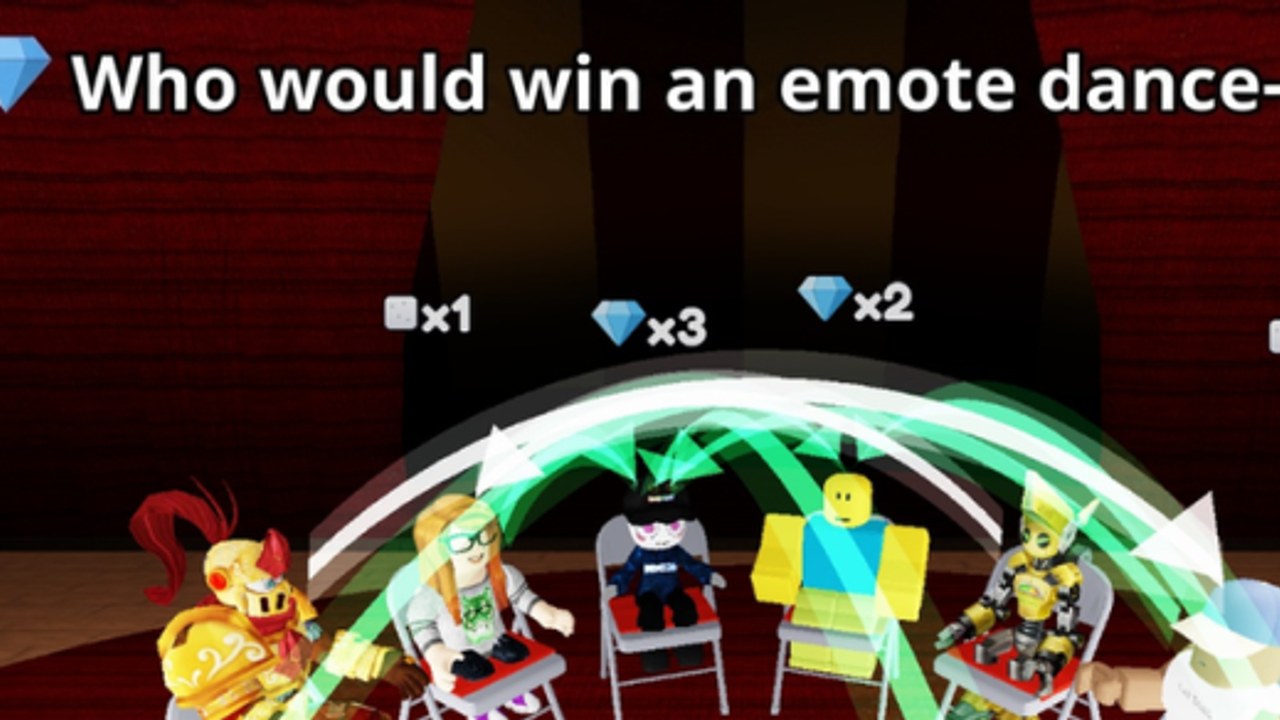
Compliment is a Roblox Party & Casual experience by TÄ Games where the whole lobby takes turns saying nice things about each other. Each round shows a question, every player taps whoever fits it best, then the big reveal fires arrows across the room. Green arrows mean you earned gems. That simple loop is why the game climbed past roughly 2.76 million visits, tens of thousands of favorites, and busy servers with up to 16 players after its release on 22 October 2026.
This page is the Links Hub for the unofficial Compliment wiki. Use it as a map to official Roblox destinations and to the deepest guides on this site. Nothing here replaces the live game UI, but every path below is written so new players can go from first join to confident voting without guessing.
Official destinations
- Play Compliment on Roblox — Place ID
124156325220041, universe10772422537 - Follow the verified TÄ Games group on Roblox for experience updates and social proof
- Watch creator and community channels on Discord and X when the studio posts codes or patch notes
Bookmark the Roblox game page first. Codes, patch timing, and social drops almost always surface there or on the creator group before fan wikis catch up.
What the game actually is
Compliment is not a combat grind or a tycoon. It is a social voting party game. You read a prompt, look around the lobby, and choose the avatar that matches the compliment best. After everyone locks in, arrows fly. Matching the room well can light up green and pay gems. Matching poorly still teaches you how friends, popularity, and meme answers skew later rounds.
Because sessions are short and social, the wiki focuses on clarity: how to join, how to redeem codes when they exist, how gems work, where the secret area is, and which voting habits consistently feel fair. Start with the Getting Started guide if you have never finished a full reveal, then skim How to Earn Gems once you care about rewards.
Wiki map for high-intent searches
Players searching this game usually want one of five things. Jump straight to the matching hub:
- Codes Hub —?current status (no working codes as of early November 2026) plus How to Redeem
- Guides Hub —?day-one loop, gems, secret area, and tips
- Tier List Hub —?voting strategies ranked S through C, including Voting Strategies
- Scripts Hub —?honest scarcity note and executor safety (no fake loadstrings)
- Players Hub —?TÄ Games, friends, and community etiquette
- Updates Hub —?launch on 22 Oct 2026 and the 8 Nov 2026 update
- Tools Hub —?Controls & UI for Codes, picks, and the reveal
Quick facts players verify constantly
| Fact | Detail |
|---|---|
| Platform | Roblox (online co-op / party lobby) |
| Creator | TÄ Games (verified Group) |
| Released | 22 October 2026 |
| Notable update | 8 November 2026 |
| Max players | 16 |
| Core reward signal | Green arrow —?gems |
| Codes (Nov 2026) | None working publicly as of 7 Nov 2026 |
| Tone | Compliments, reveals, light social chaos |
Keep these facts aligned when you discuss the game elsewhere on the wiki. Cross-page consistency matters more than stuffing every article with the same paragraph.
How to use this wiki well
- Finish one clean round using Getting Started so the UI feels automatic.
- Check Codes only after you know where the Codes button lives (Controls).
- Practice green-arrow habits from How to Earn Gems and the Tier List.
- Hunt the Secret Area once you are comfortable navigating the lobby.
- Skim Updates after each studio patch so tips stay current.
Community and safety notes
Compliment thrives when lobbies stay kind. Vote for the prompt, not to bully. Avoid scripts that claim infinite gems or auto-vote cheats —?see the Scripts Hub for why social party games rarely need executors and how risky tools can cost accounts. This wiki is fan-made and not endorsed by Roblox or TÄ Games. Always confirm codes and patch claims on official channels before trusting a screenshot.
If you only open one page after this hub, open Guides. Everything else on the site exists to support that party loop: read, tap, reveal, smile, repeat.
Frequently Asked Questions
Quick answers about Compliment on Roblox.
Is this Compliment wiki official?
No. This is an unofficial fan resource. Confirm codes, patches, and group news on the Roblox game page and TÄ Games channels.
What is the core loop in Compliment?
Read the question, tap the player who fits it best, then watch the reveal. Green arrows award gems. Details live in Getting Started.
Where should new players go first?
Start with Getting Started, then Controls, then Codes and How to Earn Gems.
Are there working codes right now?
As of 7 November 2026, no working Compliment codes were publicly listed. See the Codes Hub and How to Redeem for status and steps.